
Make website barriers easier to find and easier to report and address
Accesserty brings together search-result signals, user reporting, interaction monitoring, in-browser checks, and open-source components so people and website maintainers can improve accessibility together.
Choose the right tool
Choose a tool for the problem you need to solve
- See accessibility statements, certifications, and badges before opening a result
Accesserty Signal
Signal shows matched accessibility statements, public certification and badge records, and ALLY maintenance signals beside Google and Bing results. If a page is hard to use, the extension also lets you send a report from that page.
- Live website accessibility maintenance, ordered by the pages to review first
Accesserty Pulse
Add one lightweight script. Pulse organizes accessibility reports, interaction-difficulty clues, and low-frequency page scan summaries so maintainers know which live pages deserve review first.
- In-browser web, WCAG, and PDF accessibility checks
Accesserty DevCheck
Check accessibility on localhost, staging sites and pages behind a login, or inspect PDF structure. Start with local scans, then review the findings manually. Optional AI semantic checks transmit sampled content.
- Accessible Web Components built around an HTML-first approach
Accesserty UI Kit
When native HTML does not cover a composite interaction, use reusable keyboard behavior, state management, and accessibility semantics. The MIT-licensed components work in plain HTML and major frontend frameworks.
What do you need to do?
You do not need to understand the whole product suite. Start with the task in front of you.
Check public accessibility signals while you search
See supported certifications, accessibility statements, and ALLY maintenance records in Google and Bing results, and report barriers when you encounter them.
Find where people may be struggling on your website
Track repeated clicks, blocked keyboard interactions, focus reversals, possible keyboard traps, focus return locks, and repeated form attempts while managing Signal user reports in one place.
Inspect a live page, authenticated flow, or PDF
Run automated checks, simulations, AI-assisted semantic review, and PDF structure checks in the browser.
Build reusable accessible interaction patterns
Use framework-friendly Web Components when native HTML alone does not cover a composite interaction.
A path from noticing barriers to fixing them
Signal helps people see accessibility signals and report barriers. Pulse helps maintainers decide which pages to review first. DevCheck and UI Kit support checking and fixing work.
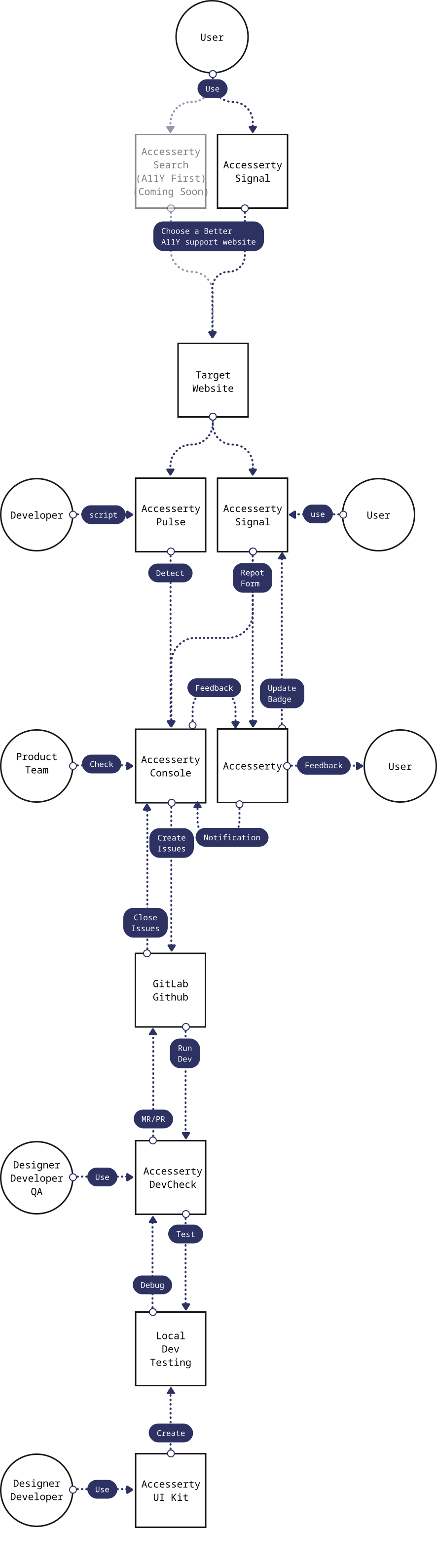
Accesserty does not treat accessibility as a one-time audit. People can notice public signals and report barriers, maintainers can use reports and interaction clues to decide what to inspect, and the people making changes can use tools to confirm and improve pages. These records are improvement clues, not a complete audit or compliance guarantee.
Have a data source, product question, or partnership idea?
Contact us to suggest a public accessibility data source, ask about a product, or discuss a practical collaboration.